
What is IPTV? The Complete Guide to Internet Protocol Television
If you are tired of sky-high cable bills and restricted channel lineups, you might be wondering, what is IPTV?
IPTV stands for Internet Protocol Television. Unlike traditional cable or satellite services that beam signals through a dish or a coaxial cable, an IPTV service delivers television content directly through your broadband internet connection. This innovative approach gives viewers total control over how, when, and where they watch their favorite shows, live sports, and blockbuster movies.
For beginners, the transition is seamless. A high-quality IPTV subscription feels incredibly similar to the modern streaming platforms you already use, but with the added benefit of massive live TV directories and global content.
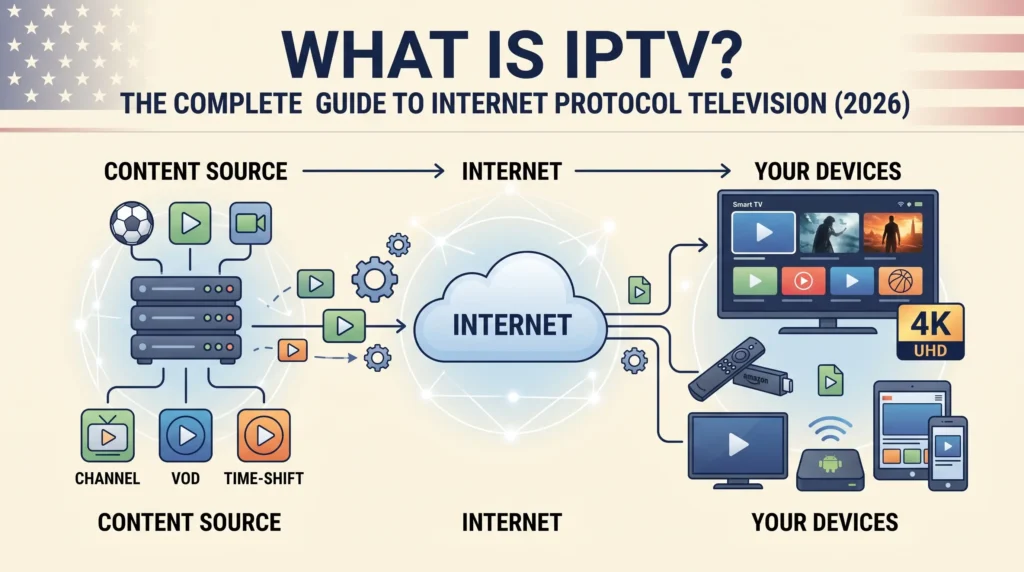
How Does IPTV Work?
At its core, IPTV works by sending video content through a managed internet network. This process ensures stability and offers interactive features that older TV formats simply cannot match. While the process feels simple to the viewer, a lot of advanced technology operates behind the scenes.
The Tech Behind the Scenes: IPTV Encoders
First, the media content must be digitized. Broadcasters and IPTV providers use an IPTV encoder to capture video. Often, high-end setups utilize a 4K HDMI IPTV encoder or an SDI IPTV encoder to compress massive video files without losing visual clarity. This HDMI to IPTV conversion turns a standard video signal into a digital stream that can travel smoothly across the internet.
Once encoded, the content is securely stored on servers and pushed through a Content Delivery Network (CDN) to your home network, ensuring minimal buffering.
What is IPTV Used For?
IPTV is designed to match today’s on-demand digital habits. It is widely used for:
Live TV Streaming: Watch breaking news, live sports, and entertainment channels in real-time.
Video on Demand (VOD): Browse a massive library of movies and TV series to watch whenever you want, giving you complete control over your viewing pace.
Catch-up TV: Missed a crucial broadcast? Many of the best IPTV services store recent broadcasts so you can play them later.
Multi-Device Viewing: Run your service on smartphones, smart TVs, or an IPTV box.
What are the Different Types of IPTV?
Understanding the different formats will help you choose an IPTV service that fits your lifestyle.
1. Video on Demand (VOD)
VOD allows you to select and watch video content whenever you please. There is no set broadcast schedule, making it perfect for viewers who love to binge-watch series or watch movies on their own time.
2. Live IPTV Streaming
This type mirrors traditional television but uses internet delivery. It broadcasts live events as they happen. When optimized by top IPTV providers, viewers enjoy quick access and highly stable streams.
3. Time-Shifted IPTV
Time-shifted content lets you catch up on programs you missed. You can watch shows that aired recently without waiting for network repeats.
Free vs. Premium: The Truth About IPTV Playlists
When researching how to start streaming, many users look for a free popular IPTV playlist or a public IPTV playlist (often utilizing an .m3u link found on repositories like iptv-org).
While a free IPTV list might sound appealing, it is rarely worth the headache. Public lists suffer from severe buffering, broken links, and low-resolution video because thousands of people are overloading the same server. For a reliable, buffer-free, and safe experience, upgrading to a premium IPTV subscription is highly recommended.
What Do You Need to Use IPTV?
Getting started with an IPTV USA service is incredibly straightforward. You will need a few essential tools:
High-Speed Internet: A stable broadband connection (at least 25 Mbps is recommended for 4K IPTV streaming).
A Compatible Device: You can use a smart TV, smartphone, PC, or a dedicated IPTV box (like Android TV, Magbox, or Apple TV).
An IPTV Player: This is the software used to read your subscription. Popular options include IPTV Smarters Pro, TiviMate IPTV player, and IPTV Stream Player.
A Trustworthy Provider: Your chosen IPTV provider will supply your login credentials or M3U link.
How to Choose the Best IPTV Service Provider
Selecting the best IPTV service is about more than just finding the highest channel count. To ensure you get the best value, look for:
Streaming Quality: Look for providers offering true HD and 4K streams with minimal buffering.
Device Compatibility: Ensure the service works perfectly with your preferred IPTV app.
Customer Support: The best IPTV providers offer 24/7 support via live chat or email.
Free Trials: Take advantage of an IPTV free trial to test server stability during peak evening hours before you buy.
Common IPTV Problems and Quick Fixes
Even the top systems run into occasional hiccups. Here are a few common issues and how to resolve them:
Buffering or Freezing: Usually caused by slow internet. Restart your router or switch from Wi-Fi to a wired Ethernet connection.
IPTV Smarters Failed to Authorize: If you see the failed to authorize IPTV Smarters error, it usually means your login details were typed incorrectly, or your subscription has expired. Double-check your username, password, and URL portal.
App Crashing: Clear the cache on your IPTV smart player or reinstall the application entirely.
IPTV vs. Traditional TV: A Quick Comparison
| Feature | IPTV Service | Traditional Cable / Satellite |
| Delivery Method | Internet connection | Coaxial cables or satellite dishes |
| Content Control | Full VOD, catch-up, and live TV | Fixed broadcast schedules |
| Device Options | Smart TVs, phones, tablets, IPTV box | Requires dedicated cable boxes |
| Flexibility | Watch anywhere with internet access | Tied to your home installation |
Frequently Asked Questions (FAQs)
Is IPTV Safe to Use?
Yes, IPTV is completely safe when you choose legitimate and highly-rated IPTV service providers. Always ensure you are using secure payment methods and consider using a VPN if you want to keep your streaming activity private from your ISP.
What is an IPTV Box?
An IPTV box is a dedicated piece of hardware (similar to a Roku or Firestick) that connects to your television and your internet. It processes the digital signals sent by your provider, resulting in smoother playback and a better user interface than some built-in TV apps.
Can I Use IPTV on Multiple Devices?
Yes. Most modern IPTV subscriptions allow you to install your chosen IPTV player across multiple devices. However, you may need a multi-connection plan if you want to watch on several screens at the exact same time.
Premium IPTV Subscription Plans Tailored for USA Users
3 Months
-
35,000+ Live TV Channels
-
ALL US / Canada / UK & International
-
140,000+ Movies & Series (VOD)
-
All PPV Events & Premium Sports
-
4K, FHD & HD Streaming Quality
-
Anti-Freeze Servers
-
99.9% Uptime Guarantee
-
EPG & Catch-Up
-
Xtream Codes / M3U / MAG
-
Instant Activation
-
24/7 Support
6 Months
-
35,000+ Live TV Channels
-
ALL US / Canada / UK & International
-
140,000+ Movies & Series (VOD)
-
All PPV Events & Premium Sports
-
4K, FHD & HD Streaming Quality
-
Anti-Freeze Servers
-
99.9% Uptime Guarantee
-
EPG & Catch-Up
-
Xtream Codes / M3U / MAG
-
Instant Activation
-
24/7 Support
1 Years
-
35,000+ Live TV Channels
-
ALL US / Canada / UK & International
-
140,000+ Movies & Series (VOD)
-
All PPV Events & Premium Sports
-
4K, FHD & HD Streaming Quality
-
Anti-Freeze Servers
-
99.9% Uptime Guarantee
-
EPG & Catch-Up
-
Xtream Codes / M3U / MAG
-
Instant Activation
-
24/7 Support
2 Years
-
35,000+ Live TV Channels
-
ALL US / Canada / UK & International
-
140,000+ Movies & Series (VOD)
-
All PPV Events & Premium Sports
-
4K, FHD & HD Streaming Quality
-
Anti-Freeze Servers
-
99.9% Uptime Guarantee
-
EPG & Catch-Up
-
Xtream Codes / M3U / MAG
-
Instant Activation
-
24/7 Support